mdriver


A fast, beautiful, streaming markdown renderer for the terminal that prints markdown and uses the facilities of modern terminals to make it as interactive as possible.
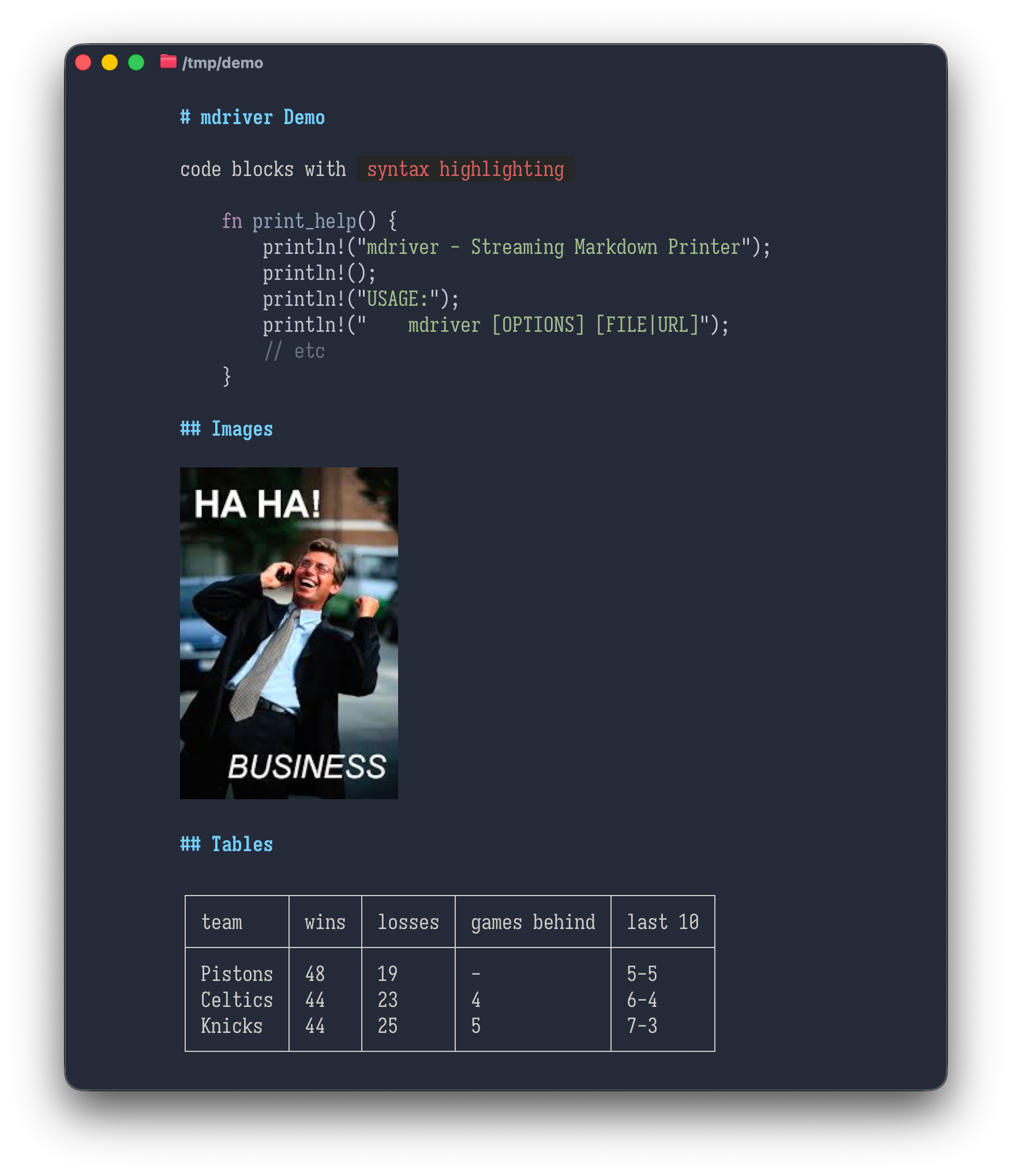
Features
Streaming output
mdriver prints markdown as it arrives, rather than
waiting for the document to complete before printing it.
Pipe your llm output through it, or a markdown file from the web, and it will display it as soon as it can.
Beautiful display
mdriver strives to present attractive, colorful output
in the terminal
Modern terminal features
mdriver will:
- display images referenced in markdown in your terminal that supports the kitty protocol (kitty, ghostty, alacritty, and others)
- syntax-highlight fenced code blocks for many languages using syntect
- render mermaid diagrams into images and display them in your terminal, or as box-drawing text diagrams when image output isn’t available
- parse a subset of HTML and display it sensibly in the terminal
- accept input from stdin, files, or URLs
- Use OSC8 hyperlinks to make links clickable
Installation
Using Homebrew (macOS)
brew install llimllib/tap/mdriverFrom crates.io
cargo install mdriverFrom Pre-built Binaries
Download the latest release for your platform from the GitHub Releases page:
- Linux:
mdriver-x86_64-unknown-linux-gnu.tar.gz - macOS:
mdriver-x86_64-apple-darwin.tar.gz(Intel) ormdriver-aarch64-apple-darwin.tar.gz(Apple Silicon)
(want windows? help me out)
Extract mdriver and add it to your PATH:
tar xzf mdriver-*.tar.gz
sudo mv mdriver /usr/local/bin/
From Source
git clone https://github.com/llimllib/mdriver.git
cd mdriver
cargo build --release
The binary will be available at
target/release/mdriver.
Usage
# Read from file
mdriver README.md

# Pipe markdown from a file
cat document.md | mdriver

# Pipe from echo
echo "# Hello World" | mdriver

# Redirect from file
mdriver < document.md

# Use a specific syntax highlighting theme
mdriver --theme "InspiredGitHub" README.md

# Set default theme via environment variable
MDRIVER_THEME="Solarized (dark)" mdriver README.md

# List available themes
mdriver --list-themes

# Render images using kitty graphics protocol
mdriver --images kitty document.md

# Control color output (auto, always, never)
mdriver --color=always README.md | less -R

# Report rendering problems (missing fonts, skipped SVG content) to stderr
mdriver --verbose --images kitty diagram.md

# Capture full diagnostics to a file for a bug report
mdriver --debug-log /tmp/mdriver.log --images kitty diagram.md

# Show help
mdriver --help
Diagnostics
By default mdriver is silent: when it cannot render something it falls back quietly, showing alt text for a broken image or a syntax-highlighted code block for a Mermaid diagram it could not draw.
That is the right default for everyday use, but it makes some failures hard to diagnose. The worst case is a diagram that renders as a plausible image with content missing — for example shapes drawn with every label dropped because no font matched. Two flags turn on reporting:
# Warnings to stderr
mdriver --verbose --images kitty diagram.md

# Everything to a file, including HTTP and TLS activity
mdriver --debug-log /tmp/mdriver.log --images kitty diagram.md
--verbose (or -v) reports warnings from
mdriver and from the SVG renderer it uses, such as skipped SVG elements,
unresolvable fonts, and image or Mermaid fallbacks.
--debug-log <FILE> writes every message, timestamped
and truncating the file each run; it is more detail than is usually
useful, but it is what you want attached to a bug report. Both can be
used together.
Diagnostics only ever go to stderr or the log file, never to stdout, so neither flag changes rendered output. Piping and redirection are unaffected:
mdriver --verbose --color=always README.md > out.txt   # warnings still on terminal
mdriver --verbose --color=always README.md 2>/dev/null # warnings discarded
Syntax Highlighting Themes
mdriver uses the syntect library for syntax highlighting, supporting 100+ languages with customizable color themes.
Available Themes
Use mdriver --list-themes to see all available themes.
Popular options include:
- InspiredGitHub - Bright, vibrant colors inspired by GitHub’s syntax highlighting
- Solarized (dark) - The classic Solarized dark color scheme
- Solarized (light) - Solarized optimized for light backgrounds
- base16-ocean.dark - Calm oceanic colors (default)
- base16-mocha.dark - Warm mocha tones
- base16-eighties.dark - Retro 80s aesthetic
Setting a Theme
There are three ways to configure the theme (in order of precedence):
- Command-line flag:
mdriver --theme "InspiredGitHub" file.md - Environment variable:
export MDRIVER_THEME="Solarized (dark)" - Default:
base16-ocean.dark
Example
# Use InspiredGitHub theme
mdriver --theme "InspiredGitHub" README.md

# Set environment variable for persistent default
export MDRIVER_THEME="Solarized (dark)"
mdriver README.md

# Combine with piping
MDRIVER_THEME="base16-mocha.dark" cat file.md | mdriver
Image Rendering
mdriver can render images inline in your terminal using the kitty graphics protocol. This feature works with any terminal that supports the kitty graphics protocol (kitty, WezTerm, Ghostty, etc.).
In terminals without image support, images will display as alt text.
Use the --images kitty flag to enable image display:
# Render local images
mdriver --images kitty document.md
# Works with remote URLs
echo "" | mdriver --images kitty
# Combine with theme selection
mdriver --theme "InspiredGitHub" --images kitty README.mdImage Features
- Auto-resize: Images automatically resize to fit terminal width while preserving aspect ratio
- Remote URLs: Fetches and displays images from HTTP/HTTPS URLs
- Graceful fallback: Shows alt text when image fails to load
- Backward compatible: Without
--imagesflag, images render as plain text - Extensible: Architecture supports future protocols (sixel, iTerm2, etc.)
When images are suppressed
Graphics escapes are only meaningful when mdriver is writing straight
to a terminal that understands them, so --images is ignored
when:
- stdout is a pipe or a file, where the escapes would otherwise be written into your output
- running under tmux or screen, which mangle graphics sequences rather than forwarding them
Run with --verbose to see why images were dropped. If
the detection is wrong for your setup, set
MDRIVER_FORCE_IMAGES=1 to emit them anyway.
Color Output Control
By default, mdriver automatically detects whether to use ANSI colors
based on whether stdout is a terminal. You can override this behavior
with the --color flag.
Color Modes
| Mode | Description |
|---|---|
auto |
Use colors only when stdout is a terminal (default) |
always |
Always emit ANSI color codes, even when piping |
never |
Never use colors |
Development
This code is written almost entirely by an LLM. It started as an experiment in LLM-driven usage and I’ve found it to be successful so far; I use mdriver every day and it’s been very useful to me.
I can read rust, but I don’t really have aesthetic opinions on it; I chose to build this in rust for that reason. Quality is mainly enforced by a thorough test suite and static checks, as well as my own opinions about how CLI programs ought to behave.
I care about binary size, and have disabled as many features from imported libraries as possible, and avoided libraries where possible, with the proviso that this is intended to be a featureful application rather than a minimal one. As of this writing it is 8.1mb.
Static checks & tests
See docs/conformance.md for details on the test suite
# All must pass before committing:
cargo fmt                                                # Format code
cargo build                                              # No warnings
cargo build --release                                    # No warnings
cargo clippy --all-targets --all-features -- -D warnings # No errors
cargo test                                               # All tests pass
See CLAUDE.md for comprehensive development guidelines
and best practices.
Contributing
- Fork the repository
- Create a feature branch
- Write tests first
- Implement feature to pass tests
- Ensure all quality checks pass
- Submit pull request
License
MIT